Showing posts with label mac os. Show all posts

Tuesday, December 27, 2016

Raspberry Pi PC and Mac has opened for the Debian + PIXEL OS.


Tiunata some news today, some tutorials. Many of you may Raspberry Pi (Raspberry Pi) heard of the name. Many people may know about. Raspberry Pi chain of tune for a long time I want to. But do not get time to test S.S.C improve. However, when the time will be. Meaning those who do not give the idea of ​​Raspberry Pi. In fact, it is a device IOT. You can tell a small CPU. It has debalapa London, UK's Raspberry Pi Foundation. There are a lot of devices like Red Raspberry Pi IOT. But it is especially popular for several reasons. Official price of this device is only $ 35. It mouse, keyboard, monitor, and planted it in a computer. Mekanikyaladera usually robotic device for the IOT. Because it's like Python programming can be applied on the machine. However, this post will discuss about the chain.I came out with OS. Raspberry Pi in Windows, Linux can not be set up like a normal OS. There's something special for yegula besikyali Linux-based OS. Fedora, Ubantu MATE, Kali Linux, Ubantu Core, RISC OS (Linux distributions do), Arch Linux ARM egulai. Raspberry Pi 'Debian- for the Raspberry Pi Foundation, a Linux-based Raspbian disto has debalapa. Microsoft Corporation, Windows 10 IOT has rilaja OS, which is the name of a Raspberry Pi complicated. Keep an eye on my id. At any one time may be later followed by a deeply Raspberry Pi will tune in to see the chain. Raspberry Pi Foundation for Mac and PC Satellite chereche Debian + PIXEL market. Raspberry on your Mac and PC at the PIXEL can enjoy. Details below.in an effort to build for the x86 platform, Raspberry Pi Foundation, a pixel PG, and for Mac- released desktop spin. To download a test version of Debian + PIXEL available. 500MB RAM- it can run smoothly on older computers. During the British rule, if your PC is installed PIXEL PIXEL desktop can taste it.On September 016, Raspberry Pi Raspbian distributions depending on their Debian- Pixel desktop environment for the wide-eyed, they released Xfce. Raspbian, Pi 's are designed to work with ARM processor.Three months later, they have a desktop version of the Pixel - Debian Jessie distro with x86 processors, which combine with and compatible. Now it can be installed on Mac and PC. Even if you do not have your Raspberry Pi Raspberry Pi hardware resources to be able to enjoy the fun of decent GUI not changed. Minimum 512 MB of RAM (RAM) of the Debian + PIXEL can be installed on any PC.Pikselata This is a prototype, and it has all of the applications that you did pixels Red Raspberry Pi. It is well-liked applications Wolfram Mathematica Minecraft and they have been dropped. Because these applications are only licensed for Raspberry Pi hardware.


PC / Mac- Desktop to install the pixels -
 Debian+Pixel ISO for x86 platforms [official website (direct)]
first dload iso file from upper link then
 ISO After downloading, you can burn it on a DVD- or USB drive can create bootable. If you have a USB drive and boot the machine can be used without installing pixels means you can run on Live. As in the Ubantu. But in case it is not possible to DVD-.Remember, before you install the ISO on your machine you should backup all your data. Because it is not a stable build. This is an alternative method that comes to you as it is your virtual machine Oracle Virtual Box, VMware egulate can install.
 

Friday, December 23, 2016

Kiwi for Gmail 2.0.4


Kiwi-for-Gmail-2.0.4.torrent

Download
Name: Kiwi for Gmail
Version: 2.0.4
Size: 71.06 MB
Mac Platform: Intel
Includes: Pre-K’ed
OS version: 10.10 or higher
64 bit
Whats new:
– Find in page for inbox and message windows (cmd-f brings up Find, cmd-g moves to next match)
– Fix layout issue for certain configurations
– Fix issue with crash in rare circumstances
– Fixes for SSO issues with not quite valid certificates
– Update the unread counts when waking up
– Resolve a security bookmark issue for download location handling
– Stay quiet when the OS is in Do Not Disturb mode
– Speed up display of compose new message window in certain situations
– Resolve a potential crash on initial install
Courtesy of TNT Team.
App Store: https://itunes.apple.com/us/app/kiwi-for-gmail/id986304488?ls=1&mt=12
More Info: http://kiwiforgmail.com/index.php
Kiwi for Gmail 2.0 integrates all of G Suite (formerly Google Apps) with Gmail as the centerpiece. We turn Gmail and the rest of G Suite into a full-powered desktop client that takes everything you know and love about Gmail and apps such as Docs, Sheets and Slides, and add great new features – including the ability to simplify your life by seamlessly managing multiple Gmail accounts. Finally a solution for office productivity that competes with Microsoft Office 365.
Kiwi for Gmail 2.0 with G Suite revolutionizes Gmail by transforming not only the functionality and interface of Gmail itself, but also how it works with Google Apps. By providing multiple windows, desktop integration, and a simple, intuitive interface that allows you to quickly access each application, open new documents, and get back to recent documents with a single click, Kiwi for Gmail 2.0 now gives you all the great functionality of G Suite apps in a better way.
One of the most anticipated apps on Kickstarter in 2015 and two years in the making, Kiwi for Gmail delivers a sophisticated app that thoroughly integrates Gmail into your desktop experience in ways that simply aren’t possible in the browser. To do this, we rebuilt how Gmail functions on the desktop from the ground up to make it faster, easier to use, and more reliable.
Get started today and discover a whole new way to use Gmail and G Suite.
screenshot

Desktopr 1.8 – Create dynamic desktops

Desktopr is simple way to extend your desktop with any content you can even imagine.Desktopr

With Desktopr you can set any website, quartz composition, flash movie or other content as your desktop background.

Imagine your Facebook, Gmail, Twitter or favorite blog or magazine as a background of your desktop. You can switch currently showed content from desktop level to front anytime from menu bar and start browsing immediately.

All content items (websites / animations / movies / …) are easy configurable and for all of them may be set specific duration from 10 seconds to unlimited. Count of content items is unlimited.

Youtube and Vimeo movies are played in fullscreen automatically (optional).

Flash or other plugins can be optionally disabled.

WHAT’S NEW
Version 1.8:
  • Improved for macOS Sierra

REQUIREMENTS
  • Intel
  • OS X 10.7 or later

ScreenShots :

download

Size – 3.5MB

CrossOver 16.0.0

crossOver 16.0.0
Run Windows apps on your Mac.
Description
CrossOver can get your Windows productivity applications and PC games up and running on your Mac quickly and easily. CrossOver runs the Windows software that you need on Mac at home, in the office, or at school without purchasing a Windows license, without rebooting your computer, and without having to use a virtual machine. And CrossOver can run a wide range of Windows software.
Easy Installs! Many Windows titles can be installed using our CrossTie technology. If you have CrossOver installed, and have the installer for your Windows software, simply click the button in our Compatibility Database, and CrossOver will automatically install your application for you!

What’s New

Version 16.0.0:Note: Now requires OS X 10.8 or later. “more…”

Requirements

  • Intel
  • OS X 10.8 or later
NFO
  • URL: https://www.codeweavers.com/products/crossover-mac/
  • Price: $59.95
  • Size: 188MB .dmg
  •  for tutorials pls visit https://youtu.be/OXrkVMPAAGs
  •  
Download CrossOver for macOS Free Cracked

Capto – Screen Recording, Screen Captures, and Editing 1.2.3

Developer: Global Delight Technologies Pvt. Ltd
Price: $29.99
  • Capto - Screen Capture, Recording & Editing Screenshot
  • Capto - Screen Capture, Recording & Editing Screenshot
  • Capto - Screen Capture, Recording & Editing Screenshot
  • Capto - Screen Capture, Recording & Editing Screenshot
  • Capto - Screen Capture, Recording & Editing Screenshot

Description

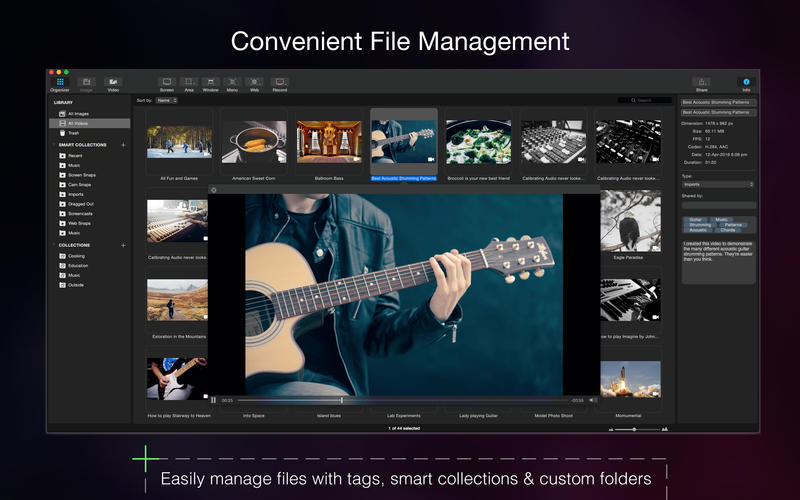
Capto is a new screen recording and editing app suite that’s perfect for creating informative and compelling captures.
Instantly record a video of your screen or take a screenshot, edit it and share at the press of a button. The app has a broad range of image and video editing tools as well as an easily navigable folder-based organizer for your screen captures. You can also setup instant sharing to all popular platforms like YouTube, Dropbox, Tumblr, FTP/SFTP servers and more by signing into them just once inside Capto. “more…”
Online Platform Sharing | Server Sharing
Instantly share or upload screenshots and screen recordings to your favorite services like Facebook, Tumblr, Dropbox, Evernote, YouTube and more directly with a single click. Capto also supports FTP/SFTP server uploads.
Please follow Capto on social media for news, updates and tips.
Twitter – @CaptoForMac
Facebook – CaptoForMac

Recordam 1.1.2 – One-click audio recording

Recordam, an elegant and easy-to-use application for recording audio, lets you create a new record in one click. It combines a recordampowerful high-quality audio recorder and convenient storage for recorded audio files. The modern, user-friendly interface allows you to see everything at a glance, including the current input device and an input-volume level so you can start recording straight away.

Features
  • Recording
    • Start recording in one click. Launch the app, and it is immediately ready to record.
    • Easily switch between audio input device right into Recordam. You can use a built-in microphone or an external audio input device (including USB microphone).
    • Change the input volume level even during recording.
    • Pause / Resume recording.
    • Unlimited recording time. You can record just about anything, so long as you have enough storage on your Mac!
    • High-quality audio recording.
  • Playback
    • Control the player from the intuitive interface, main menu controls or keyboard shortcut. Easily switch between audio recordings or even move forward or backward within an audio recording.
  • Library
    • Get quick and easy access to all of your recordings using the Library view.
    • Import M4A and MP3 audio
    • Integrate with tags in Finder
    • Share audio recordings via Mail, Message and AirDrop.
    • Add audio recordings to iTunes.
    • Export audio recordings to M4A format in a few clicks.
    • Add author and subject tags for each audio recordings using built-in Inspector.
    • Easily share your Recordam documents, just export their on your Mac and then add them to library on the other Mac.

WHAT’S NEW
  • Import files in AIFF format has been added
  • Fixed an issue with importing audio files

REQUIREMENTS
  • Intel, 64-bit processor
  • OS X 10.11 or later

ScreenShots :

download
Size – 4.6MB

Wednesday, December 21, 2016

Total Video Converter Pro 4.3 . Get your Copy

Total Video Converter Pro 4.3
Total Video Converter Pro is a full-featured converter, video editor and DVD burner that supports almost all video and audio formats. It can convert videos for Apple TV, iPad, iPhone, iPod, Xbox 360, PlayStation 3, PSP, mobile phone: Blackberry, Nokia, Samsung, and many others!
Total Video Converter Pro = Mac Video Converter + iPad Video Converter Mac + Mac Video Editor + Mac Audio Converter + HD Converter Mac + Mac DVD Burner + DV Auto Importer + Video Combiner + GIF Exporter + Audio Extractor + Movie editor + Video Multiplex

What's New

Version 4.2.2:
  • Release notes were unavailable when this listing was updated.

Requirements

  • Intel, 64-bit processor
  • OS X 10.9 or later

 http://eshareload.com/?download=9294

Monday, December 19, 2016

Control your mac cooling fan easy

 HDD Fan Control
HDD Fan Control controls fan speed in relation to drive temperature. If you have replaced your iMac's Hard Drive with a new Hard Drive or a SSD and the fan has started running at full speed creating a lot of noise, HDD Fan Control will control the fan speed, preventing the loud noise whilst keeping your drive safe. NOTE: This app is specifically designed to control your HDD Fan using your drives S.M.A.R.T data for iMacs with replacement drives which no longer provide correct temperature data to Apple's sensor.
HDD Fan Control will run the fan at the correct speed, and keep your drive cool and safe from overheating. If you are looking for an application to adjust your Mac's fans from stock (and not to control fan noise after replacement disk) we can highly recommend the free smcFanControl or iStat Menus

What's New

Version 2.5 Added support for OS X 10.10 Yosemite

Requirements

  • Intel
  • OS X 10.6 or later
  • iMac
 leave a comment please

Top 5 Best Download Manager Apps for Mac

In this writing, I summary the top 5 most popular and powerful download manager apps for Mac OS X 2014-16..
Mac OS X brings a new world for users and surely there are many Mac users are still obsessed with some supper ownsome software features that they like to use on Window system such as Internet download manager (IDM). However, there are obviously many good download manager apps for Mac with great features.
The order below is arranged from 1 to 5 according to personal evaluation perspective, people can comment your opinion

1, Folx pro - the best download manager app


There are 2 versions of Folx. Folx + is a free version with restricted hot features. Whereas, Folx Pro is a download manager app according to it's best performances in OS X and also it's extremely simple and easy managing. It provides full of interesting features especially the automatic link catching very intelligent. It should be the best one to be compared with IDM by missing only the splitting downloaded file to increase the maximum download speed.

2, iGetter - Provide high download speed


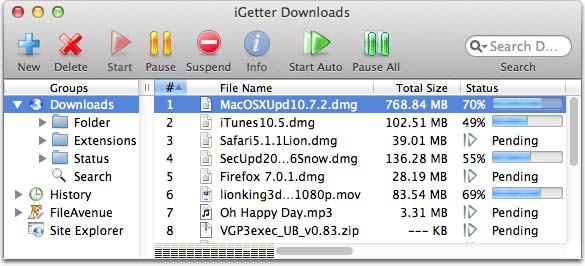
iGetter is also a download manager app with full basic features. In particular, it improves the download speed by using segments downloaded. I also like the feature of automatically reboot to load the broken connection and hang up, shut down when the download processes is complete.

3, Jdownloader 2


JDownloader is a pretty good app to manage and download with high speed on Mac OS operating systems. I've never used this app but the interface looks very friendly and simple. The advantage of this is to use the most basic features as you can start, stop or pause downloads, set bandwidth limits, automatic archiving, and extracting. It seems to be like the safari download manager.

4, Leech - efficient download managing app


Leech is a download manager application, a good choice for Mac users. With leech, you complete control over the download file from internet because it features of an integrated browser. Users can pause and resume downloads, or download from the server requires password automatically by an setting a password record function

5, Speed Download Lite


Speed ​​Download Lite provides all the features that an Mac users expect from mac os x download manager ideals. With modern interface, it was so remarkable and popular as I remember a few years ago. But the screen and control penal is not really easy to manage, and another very serious problem is the very high price for one license key.
Why do I put it last one? Because yazsoft no longer continue to develop this software anymore after sales are not as expected. All commercial users purchase after January 21, 2014 will not be supported and solve any problems. However, you can download Speed ​​Download Lite with keygen full version here:

The simplest, Safest Way to Clean Your Mac dload link added

CleanMyMac two is an ingeniously straightforward, yet surprisingly powerful application for keeping your Mac clean, organized, and freed from files that slow it down. It's merely the most effective app for cleaning up your Mac!

CleanMyMac FEATURES

Clean Your Entire Mac
Macs are easy. Mac cleaners should be too. With CleanMyMac two you'll be able to scan every in. of your Mac with simply one click. Automatic Mac Cleanup algorithms will then select solely the files that are a hundredpercent safe to delete, therefore you'll never have to worry about the wrong files being erased.
Delete Giant, Forgotten Files
CleanMyMac a pair of doesn’t just rummage around for system junk - it conjointly finds large files you’ve forgotten concerning or haven’t opened in a very while such as movies, .dmg files, and unpacked archives. CleanMyMac two incorporates a engineered-in data filter that creates finding and removing these previous, bulky files a simple task.
Optimize Your iPhoto Library
Every time you modify an image in iPhoto, its changed copy appears in your library and the original is hidden by iPhoto. CleanMyMac a pair of finds those hidden files and lets you take away them to free up additional disk house for other useful things while not harming your iPhoto assortment.
Requires iPhoto 11 (version 9+)
Management of Your Apps
CleanMyMac two assists you in keeping track of all your apps. It helps you correctly and utterly uninstall Mac applications you don't would like anymore or those who are now not compatible with your Mac. It conjointly identifies leftovers of previously removed Mac applications.
Review Your Extensions
CleanMyMac two conjointly permits you to review and take away unneeded widgets, plugins, preference panes and much a lot of. CleanMyMac two is the best Mac cleaning software available and it features an straightforward-to-use interface together with special tips on how to wash your Mac the best manner possible.

CleanMyMac SYSTEM REQUIREMENTS

Intel, 64-bit processor
OS X 10.7 or later

CleanMyMac REVIEW

Cleanmymac 2 isn't flawless, yet it accomplishes what it sets out to do—expel the debris from your Mac and free up some drive space all the while. It offers a decent measure of setup in respect to what sorts of records are tended to and uprooted the whole time. On the off chance that the engineers can wrangle the client interface into a more reasonable space, and consider full tests on outer volumes, they'll have an agreeable lead on other Mac utility holding nothing back one/spring cleaning suites looking for the same client

PROS

  • Excellent user interface 
  • Clear explanations of scan results
  • Highly configurable
  • Comprehensive set of tools

CONS and details

  • High price for the commercial one .....so need help for crack app. leave a comment pls
  • thanks
  • i am using mac os 10.7.5 lion so i give u my mac app link cleanmymac 2.2.6
  •  http://adf.ly/1h8e3W pls dload
  • no need to register. need higher version?? pls comment bellow